You applied eleven days ago. The portal says In Progress. You have read four articles about what that means and they all said something slightly different, and confidently. One told you a recruiter has opened your file. One told you an algorithm is still filtering. One gave you a timeline in days.
None of them could know. The status you are staring at was written by the employer, not by the software vendor, and two employers running the identical platform will show you different words for the same moment in the process. This piece works from the vendors' own published documentation and from two named employers who publish their own status mappings, and it is honest about the large gap between what a status proves and what you want it to prove.
The decoder ring everybody sells you does not exist
Search any status phrase and you will find a page listing ten or twenty status names with a confident gloss beside each one. “Under Consideration means a human has reviewed your file.” “In Progress means automated screening.” “This status typically lasts one to three weeks.” The pages cite each other, and eventually the citations run out without ever reaching anybody who would know.
The problem is structural rather than lazy. There is no central authority defining what these words mean, because the words are not defined centrally. Workday's own administrator documentation describes the job application business process as something an employer configures: it says you can set it up “dynamically with a list of possible next steps and dispositions for each stage”, and it documents a Step Label Override that lets an employer rename any step in its own terminology. A vendor cannot publish a universal glossary for labels its customers write themselves.
So the useful question is not “what does this status mean”. It is “what part of this is fixed by the software, and what part did this particular employer make up?”
What the platform fixes, and what each employer chooses
The part that is broadly stable is the shape of the process. Workday's documentation lists the stages a job application moves through: Review Candidate as the opening step, then Screen, Interview, Reference Check, Background Check, Offer, Employment Agreement, and Ready for Hire at the end. Almost every employer on almost every platform runs some version of that sequence, because it is the sequence hiring actually has.

Everything on the right-hand side of that picture is a local decision, and all four of them change what you see:
- The label on each step. Workday's Step Label Override exists specifically so an employer can swap the shipped wording for its own.
- Which next steps are available. The documentation describes possible next steps and possible parallel steps as things configured per stage, so two employers can run genuinely different paths through the same skeleton.
- The reasons an application can be closed. Disposition reasons are a list the employer maintains, which is why one company's rejection wording reads as a decision and another's reads as an administrative note.
- Whether you see anything at all. Candidate-facing status is a setting. Some employers surface a lot, some surface one word, some surface nothing and communicate only by email.
Two employers, one platform, two vocabularies
This is easy to assert and hard to prove, because most employers do not publish their configuration. Two do, and both happen to be large US public universities running Workday, which is the kind of employer that publishes HR guidance openly. That is a real limit on the sample and worth stating plainly. It is also enough to settle the question.
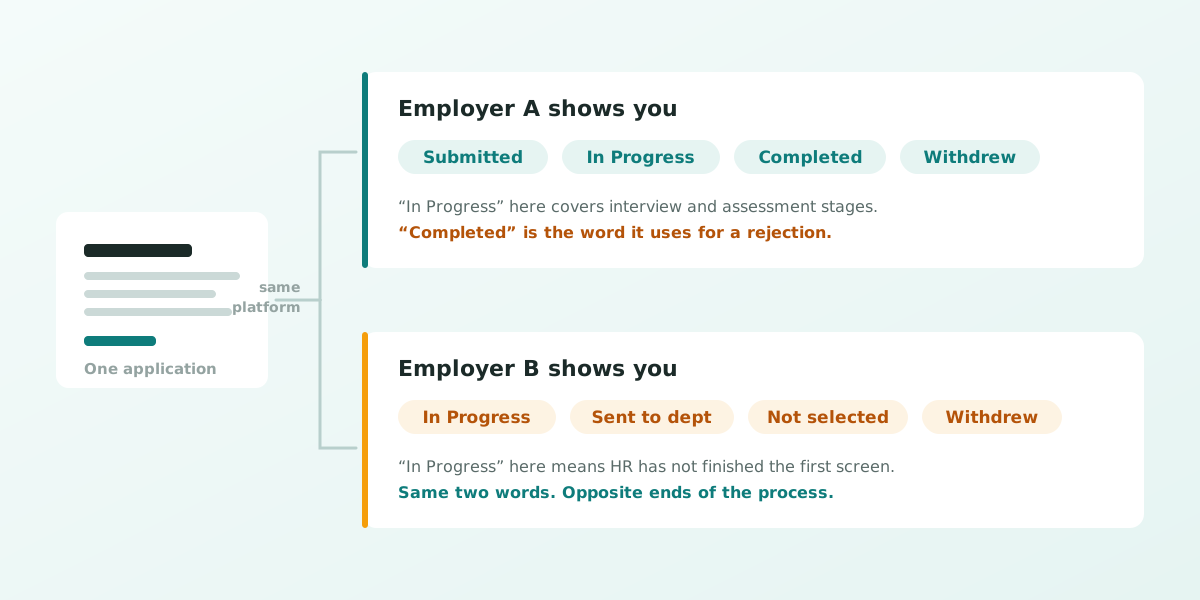
The University of Wisconsin–Madison Office of Human Resources publishes what its candidates see: Submitted, In Progress, Completed and Withdrew. In that tenant, “In Progress” covers the active stages after review, including interview and assessment. “Completed” is the word that appears when the application has been declined or the requisition cancelled.
The University of Washington publishes its own list: In Progress, Sent to dept, Not selected, Withdrew and Recruitment Canceled. There, “In Progress” has an explicit and much earlier meaning. The page states it as “Your application has been received and University of Washington Human Resources (UWHR) is reviewing your resume for minimum qualifications and eligibility.”
In Progress at UW–Madison: you are somewhere in the active stages, possibly at interview.
In Progress at the University of Washington: HR has not finished checking whether you meet the minimum qualifications.
Same platform, same two words, near-opposite positions in the process. And notice what the second list does that the first does not: it distinguishes Not selected from Recruitment Canceled, so a candidate there learns whether they lost or the job disappeared. A candidate at the first employer sees “Completed” for both.
Greenhouse: you may not be shown a status at all
Workday at least tends to show applicants something. Greenhouse is the other common case, and its candidate FAQ is unusually direct about the limits. On sharing: “If an employer has chosen to share your application status in MyGreenhouse, you can view it in Applications”, and “Companies decide which updates to share. If a status isn't visible in MyGreenhouse, contact the company for the latest.”
On how much detail exists even when it is shared: “You may see a high-level status, but not every step or decision in the hiring process.” And on asking the vendor instead of the employer, which people try: “MyGreenhouse and Greenhouse Support can't see a company's internal hiring decisions or contact recruiters for you.”
Read that alongside the Workday picture and the shape of the whole thing becomes clear. The silence is not a signal being withheld from you. In many cases the signal was never generated for you in the first place, because publishing it to candidates is an optional feature somebody either switched on or did not.
What a status can honestly tell you
This is a short list, and that is the point. Working only from what the documentation supports, a status reliably tells you:
- That your application arrived and parsed. A status of any kind means there is a record. That is worth something, because a file that fails to parse sometimes produces no record at all.
- Whether the application is still open or closed. Active and inactive is the one distinction that survives across configurations, even when the labels differ.
- Whether the employer has chosen to tell you anything else. Which is itself information about how the process will go.
What it does not tell you: whether a human has read your résumé, how many other applicants there are, where you rank, how long the stage lasts, or whether the wording that changed last Tuesday was a decision about you or a batch action somebody ran across two hundred files.
The numbers you will see quoted, and why none are here
Writing this involved reading a lot of pages on the same topic, and almost every one carried a statistic. “Under Consideration typically lasts one to three weeks.” “The status appears three to ten days after you apply.” Precise, repeated across sites, and traceable to nobody. There is no published study behind them and no vendor documentation stating them, so they are not in this article.
The same goes for the claim doing the most damage: that “Under Consideration” proves a human reviewed and advanced your file. It is stated as fact all over the results page. It is not in Workday's documentation, and it cannot be true universally, since the label itself is something an employer can rename and reassign to whichever step it likes. If a page gives you a number for how long a status lasts, ask yourself who counted.
What to do while the status does not move
The honest advice is dull, which is probably why it sells badly. There is no way to decode your way into a better outcome from a word on a portal, so the useful energy goes elsewhere.
- Treat every application as sent and gone. Log the date, the role and the contact, then move on to the next one. Refreshing a portal has never advanced an application.
- Follow up once, to a person, after about two weeks. Short, specific, addressed to the recruiter or hiring manager rather than to the portal. The portal has no inbox.
- Check the posting is real before you invest more in it. Some of the applications that never move were never going to. Our guide on how to spot a ghost job covers the signals.
- Fix the thing you can actually control. If applications consistently stall at the first stage, the résumé is the variable in your hands. Run it through the free ATS score check and see what a parser pulls out of your file.
- Match the posting's language before you apply, not after. Most first-stage filtering is on the words in the requisition. Pulling keywords straight from the job description does more than any status ever will.
See what a parser pulls out of your résumé
The ATS score check reads your file the way an applicant tracking system does and shows you what survives. No cost to run it.
Frequently asked questions
What does “In Progress” mean on a job application?
It means the application is open and has not been closed out, and beyond that it depends entirely on the employer. Two US universities running the same Workday platform publish opposite meanings for it: at UW–Madison it covers the active stages including interview and assessment, while at the University of Washington it means HR is still checking your résumé against the minimum qualifications. Nobody can tell you which kind you are looking at without knowing that employer's configuration.
What does “Under Consideration” mean?
Literally, that your application is still open. The widespread claim that it proves a human reviewed and advanced your file is not supported by Workday's documentation, and it cannot hold universally because employers can rename any step to any label they like. Treat it as active rather than as progress.
Does “Completed” mean I got the job?
No, and at some employers it means the opposite. UW–Madison publishes “Completed” as the status a candidate sees when the application has been declined or the requisition cancelled. It is a process word describing the file, not a verdict describing you, and it is one of the clearest examples of why status wording should not be read hopefully.
How long does an application stay under review?
There is no reliable published figure, and any article giving you one in days or weeks is repeating a number with no traceable source. Timelines depend on the requisition, the volume, the hiring manager's availability and whether the role is still funded. Two weeks before following up is a reasonable convention rather than a researched benchmark.
Why can I not see my application status in Greenhouse?
Because showing it is optional. Greenhouse's own candidate FAQ says an employer chooses whether to share your status in MyGreenhouse, that you may see only a high-level status rather than every step, and that Greenhouse Support cannot see a company's internal hiring decisions or contact a recruiter on your behalf. A missing status usually means the setting is off, not that something has gone wrong with your application.
Does my status change when a recruiter opens my résumé?
Not necessarily, and you should not assume it does. Candidate-facing statuses are tied to the stage the application sits in, which moves when someone takes a recorded action on it. A recruiter can read your file without moving it, and a batch action can move two hundred files at once without anyone reading any of them individually.
Should I withdraw and reapply if my status has not changed?
Almost never. Withdrawing sets a disposition on your record and reapplying puts you at the back of a queue you were already in, often with a duplicate record that a recruiter then has to clean up. If the posting is still open and something material has changed, such as a new certification, contact the recruiter directly rather than restarting the application.
Do application statuses work the same way in Taleo, iCIMS and SuccessFactors?
The same principle applies: each platform ships a workflow skeleton and each employer configures the labels, the paths and the candidate-facing visibility on top of it. The specific words differ by platform and by tenant, so a glossary written for one employer's portal does not transfer to another's even on the same software.