Writing a resume in 2026 is no longer about impressing a person first. Before a human ever reads a word, your resume has to get through machines — and the machines got a lot smarter this year. The good news: the rules are knowable, and once you understand what each gatekeeper is actually checking for, you can build one resume that satisfies all of them without gaming anything.
This is a practical, no-fluff guide. We'll cover what changed in 2026, the exact format rules that keep an ATS from mangling your resume, how to win the new semantic keyword matching (not just exact-match), how to survive a recruiter's six-second scan, and the AI tricks that genuinely help — plus the ones that will get you auto-rejected. Steal all of it.
The three gatekeepers between you and an interview
Picture your resume's journey after you hit "Apply." It passes through three checkpoints, in order. Miss any one and you're out — usually without ever knowing why.

- The ATS parser. An Applicant Tracking System (Workday, Greenhouse, Lever, Taleo, iCIMS, SmartRecruiters) ingests your file and tries to convert it into structured data — name, contact, work history, skills, dates. If it can't read your layout, your experience arrives garbled or blank.
- The AI screening layer. New in force for 2026: the parsed resume is scored and ranked against the job by an AI model that reads for meaning, not just matching words. It's looking for evidence you can do the job.
- The recruiter's scan. A human (often assisted by AI summaries) spends roughly six to eight seconds deciding yes / no / maybe. They're skimming the top third for impact, seniority and fit.
What actually changed in 2026 (the AI trends)
If your resume playbook is from 2022, here's what's different — and why it changes how you write.

1. Keyword matching went semantic
Older systems matched literal strings: if the job said "customer success" and you wrote "client retention," you scored zero. 2026 systems use embeddings — they understand that "client retention," "churn reduction" and "customer success" are related. That's good (you're not punished for synonyms) and it raises the bar: you now have to demonstrate the concept, in context, not just drop the phrase.
2. The recruiter's side is AI-assisted too
Recruiters increasingly see an AI-generated summary of your resume and a fit score before they read it. That summary is built from your bullet points. Vague bullets produce a vague summary; specific, quantified bullets produce a compelling one. You are, in effect, writing the recruiter's first impression for them.
3. Everyone can now write a decent-sounding resume
Generative AI means the baseline of polish is high across the whole applicant pool. Fluent prose no longer differentiates you — specific, verifiable results do. Some ATS and recruiter tools also flag resumes that read as obviously AI-generated boilerplate. Using AI is fine (smart, even); sounding like unedited AI is not.
4. Skills-based hiring keeps growing
More employers screen on demonstrated skills over pedigree. A clear, honest skills section — backed by bullets that prove those skills in action — matters more than the name of your university.
Part 1 — Pass the ATS bot: format for the parser
This is the unglamorous part, and it's where most good candidates lose. If the parser can't cleanly read your resume, nothing else matters. Follow these rules and your content arrives intact.
- Use a single-column layout. Multi-column resumes are the #1 cause of scrambled parsing — the ATS reads left-to-right across columns and interleaves unrelated text. Beautiful two-column designs from graphic-design tools are exactly what breaks. The safe path is to start from an ATS-verified template built as a single column.
- Use standard section headings. "Work Experience," "Education," "Skills," "Projects." Cute headings like "Where I've Made Magic" don't map to fields the parser expects.
- Keep text as real, selectable text — never an image. If you export your resume as a picture, the ATS sees a blank page. Test: open your PDF and try to select the text with your cursor. If you can't, neither can the bot.
- Put contact details in the body, not the header/footer. Many parsers ignore header and footer regions, so an email or phone number stashed there can vanish.
- Avoid tables, text boxes, and columns for layout. They frequently parse out of order or get dropped entirely.
- Stick to standard fonts (Arial, Calibri, Georgia, Helvetica, Open Sans, Lato). Exotic fonts can be mis-read character by character.
- Use standard bullet characters (• or -). Wingdings-style glyphs, emoji, and decorative icons can garble.
- Format dates consistently: "Jan 2022 – Present" or "2022 – 2024." Pick one style and use it everywhere.
- Export as PDF unless the posting asks for .docx. Modern ATS handle PDF well provided the text is selectable; PDF also preserves your layout across devices.
- Name the file like a professional: Firstname-Lastname-Resume.pdf, not resume-final-v3-REAL.pdf.
Part 2 — Win the AI: semantic keyword matching done right
Once you're parseable, the AI layer ranks you against the job. The old trick — stuffing a keyword list — is now counterproductive: modern models reward context and penalize obvious padding. Here's the 2026 approach.

- Mirror the job description's language. Read the posting and note the exact terms for the skills and tools. If they say "stakeholder management," use "stakeholder management" — where it's true for you — rather than a personal synonym.
- Spell out acronyms once, then use them: "Search Engine Optimization (SEO)". This covers both the abbreviation and the expansion, whichever the system indexes.
- Prove skills inside bullets, not just in a list. Don't only list "SQL" — write "Cut a daily report from 3 hours to 4 minutes by rewriting the pipeline's SQL." Semantic models weight demonstrated skills far higher than a naked keyword.
- Cover the role's core competencies. If the job centers on three things, make sure all three appear in your experience, concretely.
- Signal seniority with scope words: led, owned, shipped, managed a team of, budget of, org-wide. These help the model place you at the right level.
The single highest-leverage move here is the keyword gap check: compare your resume against the specific job description and find the important terms you're missing, then work the true ones into real bullets. Doing this per application is the difference between "qualified" and "top of the stack."
Part 3 — Pass the recruiter scan: write for six seconds
You've been parsed and ranked. Now a human skims. They start at the top and move fast. Everything below is about making the first third of your resume undeniable.
- Front-load impact. The top third — your headline, summary, and first role — must show your level and your best results. Recruiters rarely reach the bottom before deciding.
- Quantify everything you can. Numbers stop the eye. Percentages, dollars, time saved, people led, scale handled. "Reduced onboarding time 34%" beats "improved onboarding."
- Lead bullets with strong verbs: Led, Built, Shipped, Cut, Grew, Launched, Automated. Never "Responsible for."
- Use the X-Y-Z shape: accomplished X, measured by Y, by doing Z. It forces a result into every line.
- Reverse-chronological order. Most recent role first; it's what recruiters expect and scan for.
- Length: one page for under ~10 years of experience, two pages max for senior/technical. No one is impressed by three.
- Ruthless consistency. Same tense, same date format, same bullet style, aligned margins. Sloppiness reads as carelessness in six seconds flat.
The before → after that gets you read
The same experience, rewritten. Notice how each "after" adds a number, a strong verb, and a result — which also happens to feed the AI screener and the recruiter's auto-summary better.
Responsible for managing the company's social media accounts.
Grew Instagram from 12K to 68K followers in 11 months, driving a 4.2× increase in inbound demo requests.
Worked on improving the checkout process.
Cut checkout abandonment 18% by A/B-testing a 3-step flow, adding ~$240K in annualized revenue.
Helped the team with data and reporting tasks.
Automated 6 weekly reports in SQL + Python, saving the analytics team ~10 hours a week.
AI tricks that help — and the traps that get you rejected
AI is genuinely useful for resume writing in 2026. The winners use it as a drafting and editing partner; the losers paste its output raw. Here's the line.
Do this
- Draft, then rewrite. Use AI to turn a rough note ("ran ads, spent 50k, got leads") into a tight bullet — then edit it to be true and specific.
- Quantify with help. Ask AI what metric would make a bullet stronger; then go find your real number. Never invent one.
- Tailor per job. Paste the job description and ask which of your real experiences to emphasize and which keywords you're missing.
- Fix tone and consistency. AI is excellent at catching mixed tenses, weak verbs, and inconsistent formatting.
- Generate a first summary, then make it sound like a human who has actually done the work.
Never do this
- Ship unedited AI boilerplate. "Results-driven professional with a proven track record of leveraging synergies" is a red flag to every recruiter alive.
- Invent metrics or job titles. Hallucinated numbers fall apart in the interview and end offers when references are checked.
- Over-optimize. Cramming every keyword until the prose is unreadable trips AI-generated-content flags and human skepticism alike.
- Hide keywords in white text or off-page. Instant reject when discovered — and it usually is.
Your 2026 pre-send checklist
- Single column, standard headings, selectable text (passed the copy-paste test).
- Contact details in the body; file named Firstname-Lastname-Resume.pdf.
- Tailored to this job: mirrored language, acronyms spelled out, missing keywords added truthfully.
- Top third shows level + best quantified result within six seconds.
- Every bullet starts with a strong verb; most carry a number.
- Reverse-chronological; one page (two if senior); consistent dates and tense.
- AI-assisted but human-edited — no boilerplate, no invented facts.
- Proofread out loud once. Typos survive spellcheck; they don't survive reading aloud.
How EvoResume does this for you
Everything above is doable by hand — it's just tedious to get right for every application. EvoResume was built to do exactly this checklist for you, in one place. Here's how the tools map to the three gatekeepers.
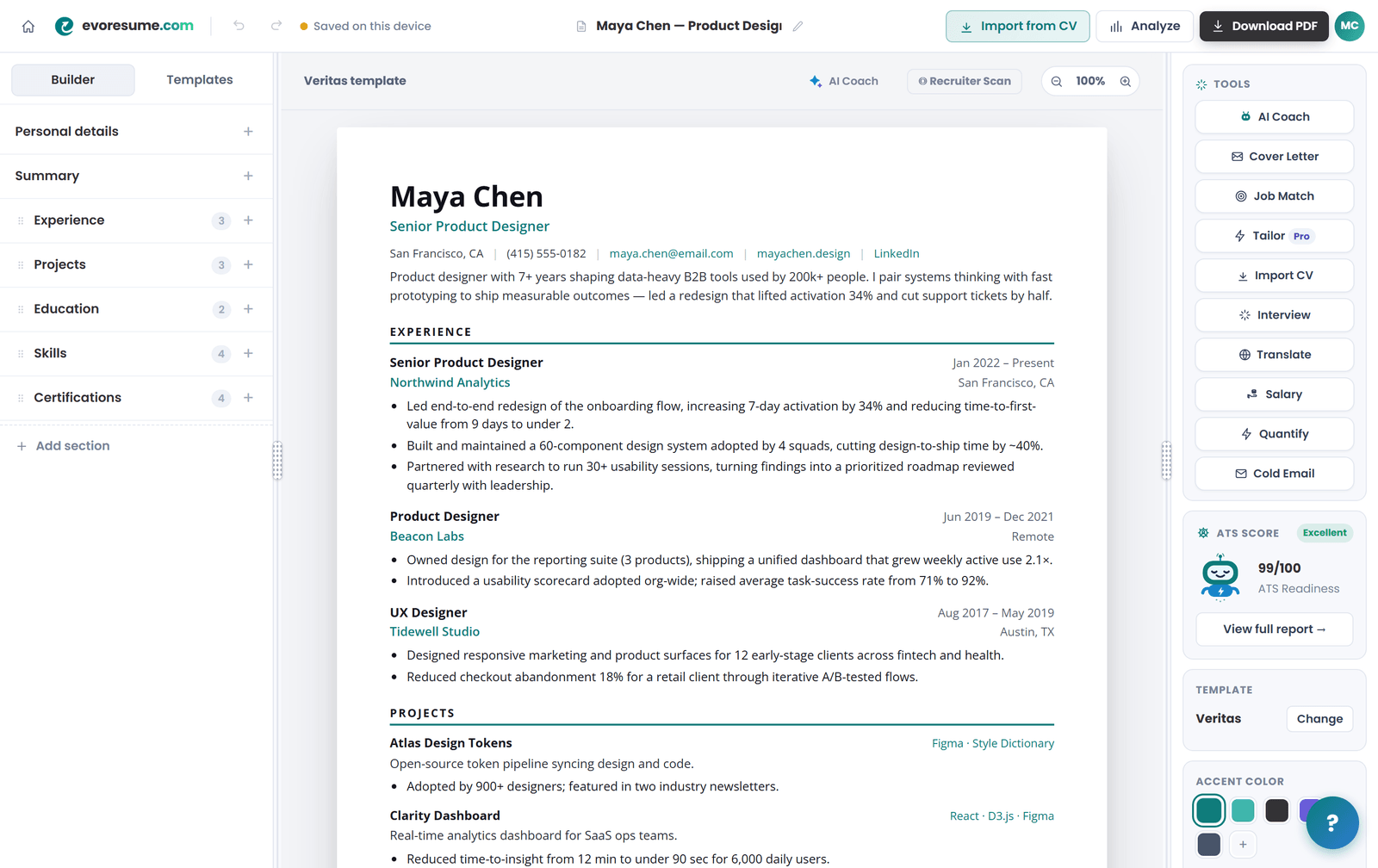
- Live ATS Score — a real-time 0–100 readiness score with category bars (contact, quantified impact, action verbs, keyword coverage, formatting, structure) that updates as you edit. This is your Part 1 + Part 3 check, live.
- Job Match / keyword gap — paste a job description and see exactly which important keywords you're missing, ranked by impact. That's Part 2, automated.
- Recruiter Scan — a deeper report that reads your resume the way a recruiter's tools do, with sections for skills, formatting, and recruiter-side tips.
- AI Coach — an assistant that has read your whole resume and rewrites weak bullets, tightens your summary, and explains your score in plain English.
- Tailor to a job — adapt your resume to a specific posting without starting over, keeping a version per role.
- 20 ATS-verified templates — single-column, parser-safe layouts tested against Workday, Greenhouse, Lever, Taleo, iCIMS and SmartRecruiters, plus a one-click PDF export with real selectable text (never a locked image).
Build a resume that clears all three gatekeepers
Free to start: real-time ATS scoring, keyword match, and 20 ATS-verified templates, no card. Downloading the PDF is $4.99 once.
Want to check your current resume first? Run it through the live ATS Score — free, no account needed — and you'll see exactly where it stands against the three gatekeepers above.
Frequently asked questions
Do AI-written resumes get rejected in 2026?
Not for using AI — for sounding like unedited AI. Generic boilerplate ("results-driven professional leveraging synergies") and keyword-stuffed prose can trip AI-content and spam flags, and recruiters spot it instantly. Use AI to draft and refine, then edit every line to be specific, true, and in your own voice.
Is one page still the rule?
For most people with under about ten years of experience, yes — one focused page beats two padded ones. Senior, academic, or deeply technical candidates can use two pages. Three is almost never justified. Recruiters rarely read past the first page anyway, so put your best material at the top.
Should I use ChatGPT or another AI to write my resume?
As a drafting and editing partner, absolutely. It's great for turning rough notes into tight bullets, suggesting metrics to hunt down, catching weak verbs, and tailoring to a job description. What it should never do is invent numbers, titles, or experience — and you should always rewrite its output so it sounds human. EvoResume's AI Coach does this in context because it has actually read your resume.
PDF or Word (.docx)?
PDF, unless the job posting specifically asks for .docx. Modern ATS parse PDFs well as long as the text is selectable (not an exported image), and PDF preserves your layout everywhere. Always run the copy-paste test on your PDF before applying.
How many keywords should I include?
There's no magic number. Cover the role's core skills and tools using the job description's own wording, spell out acronyms once, and prove the important ones inside real bullet points. Stop when it reads naturally to a human — padding past that point hurts you with 2026's semantic screeners.
Do I need a photo, and what about tables or icons?
Skip the photo (it can bias screening and doesn't parse), and avoid tables, text boxes, and decorative icons for layout — they scramble in many ATS. A clean single-column layout with standard headings and selectable text is what reliably gets read.
How is a Recruiter Scan different from an ATS check?
An ATS check is about machine-readability and keyword coverage — can the parser read you and does the AI rank you. A Recruiter Scan simulates the human (and AI-assisted) skim that comes next: is your impact obvious in the top third, are results quantified, is it consistent and easy to trust in a few seconds. You need to pass both, which is why EvoResume includes both.